How to read file content using Salesforce Agentforce
How to read file content using Salesforce Agentforce
Introduction
Businesses often receive information in the form of PDFs, Word documents, scanned forms, invoices, resumes, and identity documents. Instead of manually reading these files and entering data into Salesforce, Salesforce Agentforce can automatically analyze uploaded documents and extract the required information using AI.
In this article, we'll learn how to configure Agentforce to read document content, return structured JSON data, and process the extracted information in Apex.
👉Hire Salesforce Experts
Solution Overview
The complete solution consists of two parts:
• Agentforce Prompt Template – Reads the uploaded document and extracts
the required information using AI.
• Apex – Receives the extracted JSON, validates it, performs business logic,
and interacts with Salesforce records.
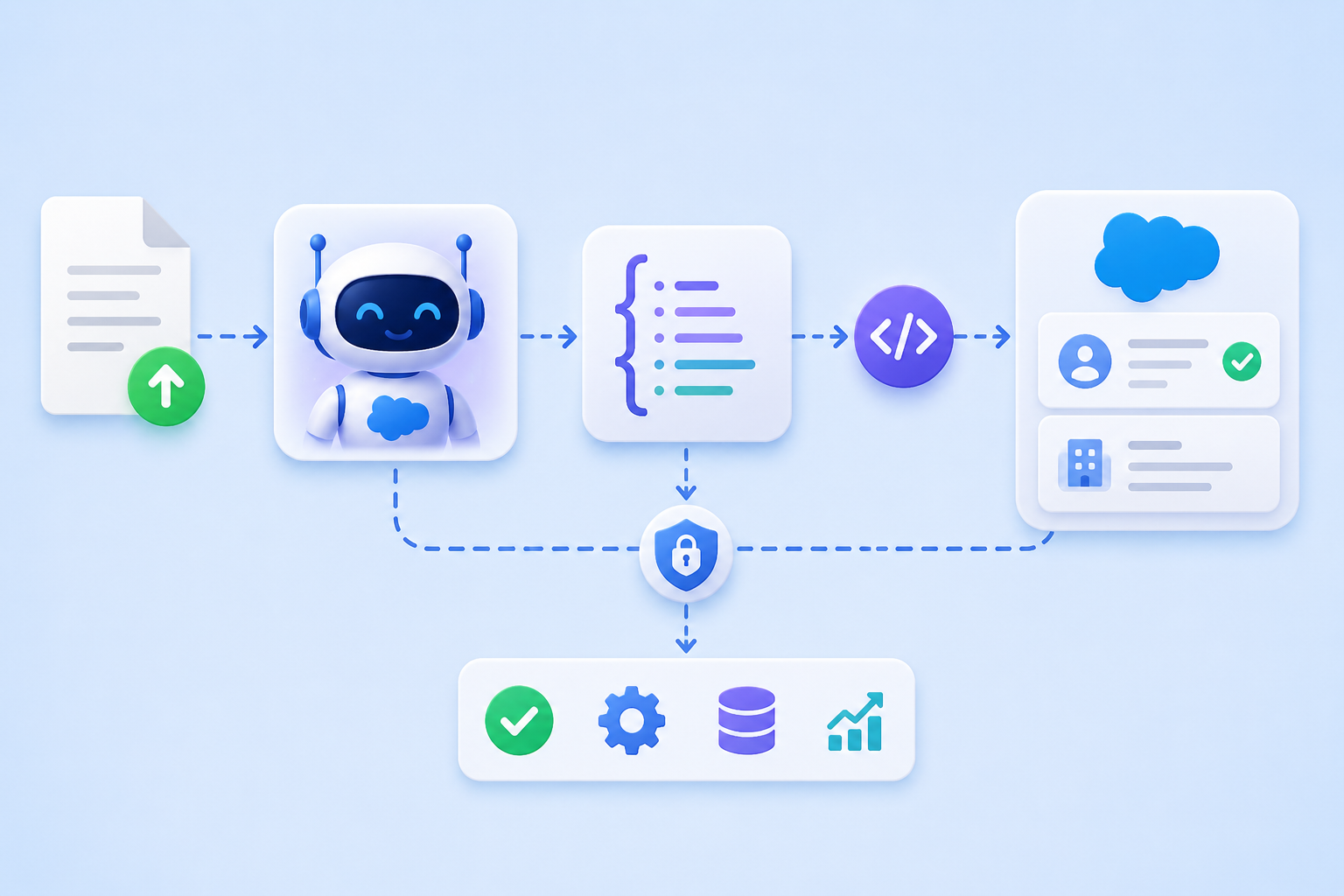
The overall flow is:
Upload File → Agentforce Reads Document → AI Returns JSON → Apex Processes Data → Salesforce Records Updated
Step 1: Create a Prompt Template
Navigate to Setup → Prompt Builder.
1. Click New Prompt Template.
2. Select the appropriate template type, Enter Prompt Template Name, API Name
and Click Next.
This template defines how Agentforce should interpret uploaded documents
Step 2 : Add File Input Parameter
3. Open the Resources tab and add a new Input Parameter. 4. Configure the parameter as:
Object: File (ContentDocument)
This allows users to upload documents that Agentforce can analyze. Step 3 : Write an Effective Prompt
5. The quality of the AI response depends on the quality of the prompt.
6. Your prompt should clearly specify:
o What information should be extracted.
o The expected output format.
o Rules the AI must follow.
For example, suppose you want to extract:
o First Name
o Last Name
o Date of Birth
o Address
You can use a prompt similar to the following:
You are a document classification and extraction agent.
Analyze the attached file and identify:
o FirstName
o Lastname
o Birthdate
o Address
Return only the following JSON:
{
"firstname": "",
"lastname": "",
"birthDate": "",
"address": ""
}
Rules:
o Extract only values found in the document.
o Do not guess missing values.
o Return empty strings if data is unavailable.
o Return only JSON.
o Keep the address in a single line.
A well-written prompt significantly improves extraction accuracy.
Step 4 : Upload a Document
7. Once the Prompt Template is configured:
Open Preview Settings.
8. Upload a sample document.
9. Click Add.
Agentforce will use the uploaded document as the input for AI processing.
Sample document:
Step 5 : Generate Structured JSON
10. Click Save & Preview.
11. Agentforce analyzes the document and returns structured JSON similar to:
Example:
{
"firstname": "Michael",
"lastname": "Johnson",
"birthDate": "April 12, 1990",
"address": "123 Maple Street San Diego, CA 92101 United States"
}
Returning JSON instead of plain text makes it easy for Apex and Salesforce
integrations to consume the extracted data.
Step 6 : Process the JSON in Apex
12. After Agentforce extracts the document information, the JSON response is sent to an Apex class.
The Apex class performs the following steps:
o Receives the JSON response.
o Deserializes the JSON using JSON.deserialize() or
JSON.deserializeUntyped().
o Extracts the required field values.
o Performs business validations.
o Creates or updates Salesforce records.
o Returns the appropriate response back to Agentforce.
Depending on your business requirements, the extracted information can be used to:
o Validate records.
o Create new records.
o Update existing records.
o Trigger additional automation.
Step 7 : Read File Content in Apex
13. Salesforce stores uploaded files using the ContentVersion object.
To access a file:
a. Receive the ContentVersion Id.
b. Query the required ContentVersion record.
c. Retrieve fields such as:
o Id
o Title
o FileExtension
o VersionData
o ContentDocumentId
o FileType
d. Read the VersionData Blob.
14. The Blob can then be converted depending on the file type:
o Text files → String
o CSV files → Parse rows
o JSON files → Deserialize objects
15. Once the content is available, Apex can execute any required business logic,
such as validating data or comparing it with Salesforce records.
Benefits of This Approach
Using Agentforce together with Apex provides several advantages:
o Reduces manual data entry.
o Extracts structured information from documents.
o Improves accuracy through AI-powered extraction.
o Keeps AI processing separate from business logic.
o Makes the solution reusable and easy to maintain.
o Integrates seamlessly with Salesforce automation.
Conclusion
Salesforce Agentforce makes document processing significantly easier by combining generative AI with Salesforce automation. Agentforce understands and extracts information from uploaded documents, while Apex focuses on validation, business logic, and Salesforce integration.
This separation of responsibilities creates a scalable, maintainable, and reusable solution for document-driven business processes. Whether you're processing identity documents, invoices, contracts, or application forms, this approach helps automate workflows while reducing manual effort and improving data quality.
Detailed Instruction: Read file content using Salesforce Agentforce
✅ Ready to build intelligent Salesforce applications with Agentforce and Apex?
👉 Hire Salesforce Experts